Generators - How to operate a DSE 7310 genset controller
The Deep Sea Electronics DSE 7310 is a very common control panel on generators from around 50kVA upwards.
It allows for both manual and automatic starting of the generator. Deep Sea panels are all generally very user friendly with simple to use buttons whilst still being able to access a wealth of information.
Deep Sea controllers have the option to be configuring bespoke settings to suit all your requirements.
Below are the simple instructions for operating the control panel:
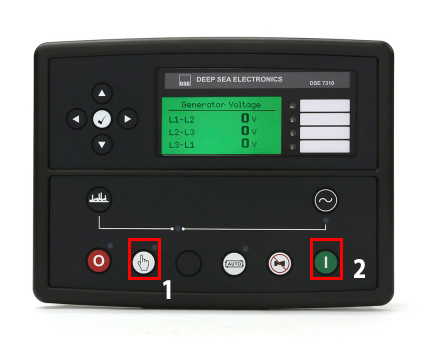
Starting Generator Manually
- Press the hand symbol which will put the generator into manual mode
- Press the green start button. The engine will pre-heat (if setup), then crank and start.
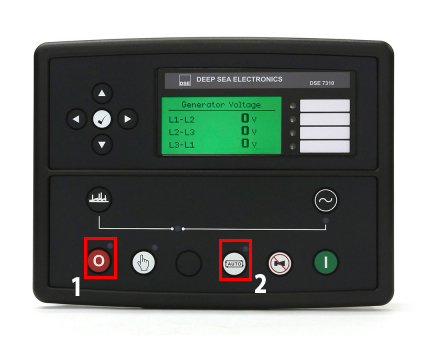
Stopping Generator Manually
- Press the red stop button once. If the generator has not been loaded and run for a very short time, the engine will immediately turn off. If it has been running with load or for a longer period of time, the control panel will start a cool-down timer before turning off the generator. This is to reduce any unnecessary wear on the engine. Never interrupt unless in an emergency.
- Once the generator has stopped, make sure that it is put back into Automatic mode. The generator will start up automatically. If you only operate the generator manually then keep it in Stop Mode.
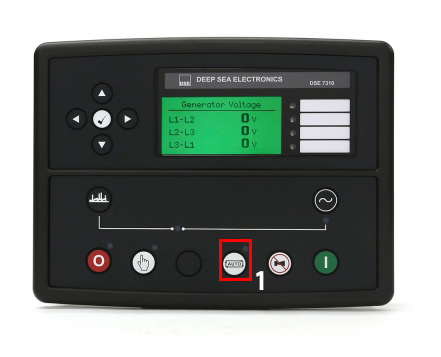
Starting Generator Automatically
- Ensure generator is in automatic mode (the light above the auto button will be illuminated)
- When the panel receives the start signal voltage from your change over panel, the control panel will commence the start up much in the same way as the manual start.